PodcastRack: Player & Mixes · iPhone & CarPlay

Stop managing a podcast queue. Just press play.

Spotify buries your shows under music and video. Apple Podcasts leaves you scrolling past 40 unplayed episodes. PodcastRack is built purely for podcast listeners—fast with 1,000+ shows, zero ads or accounts, a Smart Up Next queue that explains every pick, and Routine Mixes when you want zero surprises.

Download on the App Store Free core player · No login · OPML import
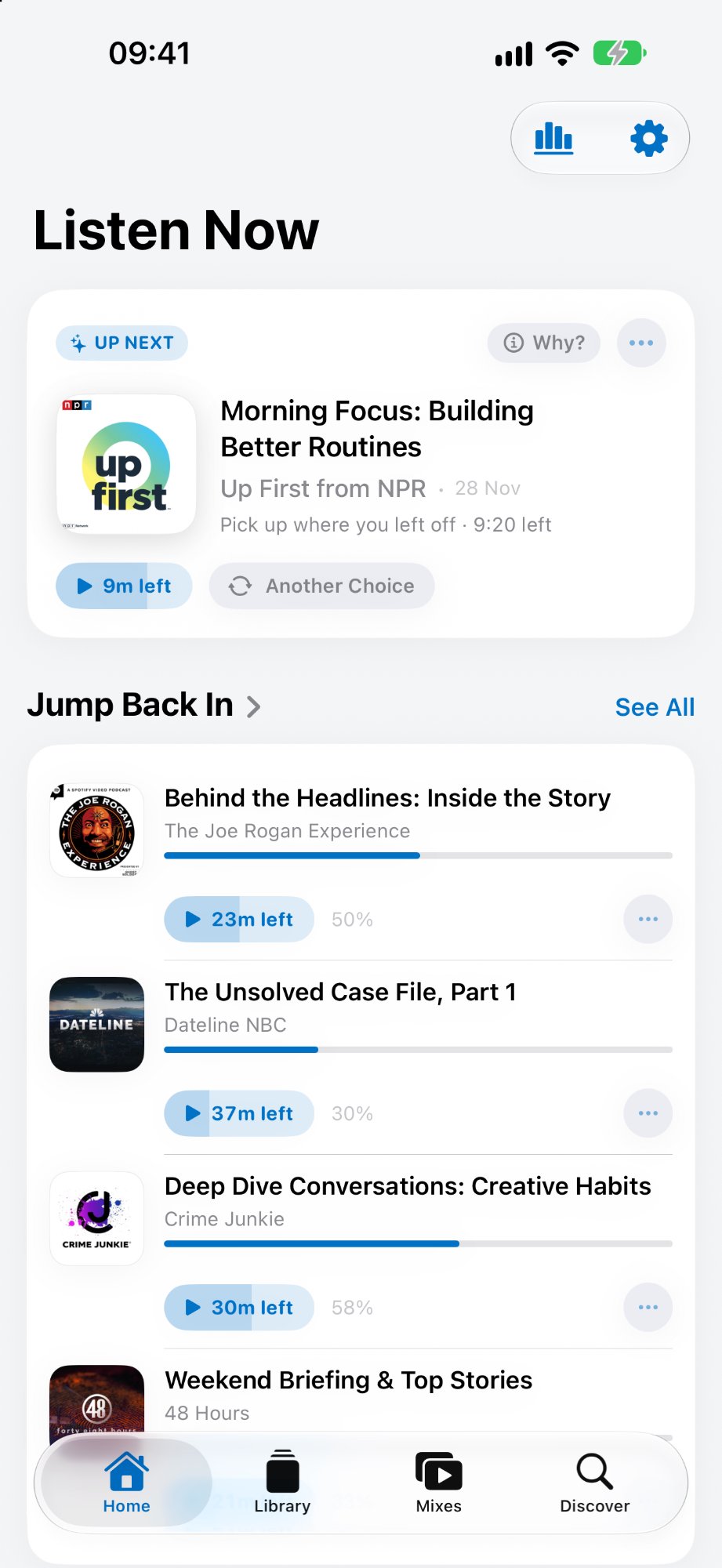
PodcastRack Listen Now screen showing Smart Up Next and Jump Back In

Whether you’re coming from Apple Podcasts, Spotify, Overcast, or Pocket Casts, you shouldn’t have to manually triage an inbox every morning—or guess what an algorithm is doing. PodcastRack remembers where you left off, respects serial order, and starts playing in one tap when you get in the car.

Listen Now with Smart Up Next and Why? button
Smart Up Next

It picks what to play next—and shows its work.

Open most podcast apps and you’re staring at a wall of 40 unplayed episodes. Smart Up Next learns your listening routine on your device, keeps serial stories in chapter order, and puts one clear episode at the top.

Curious why? Tap Why? to see the exact signals behind the pick—habit timing, unfinished progress, or whether it’s already downloaded. Not in the mood? Tap Another Choice and move on.

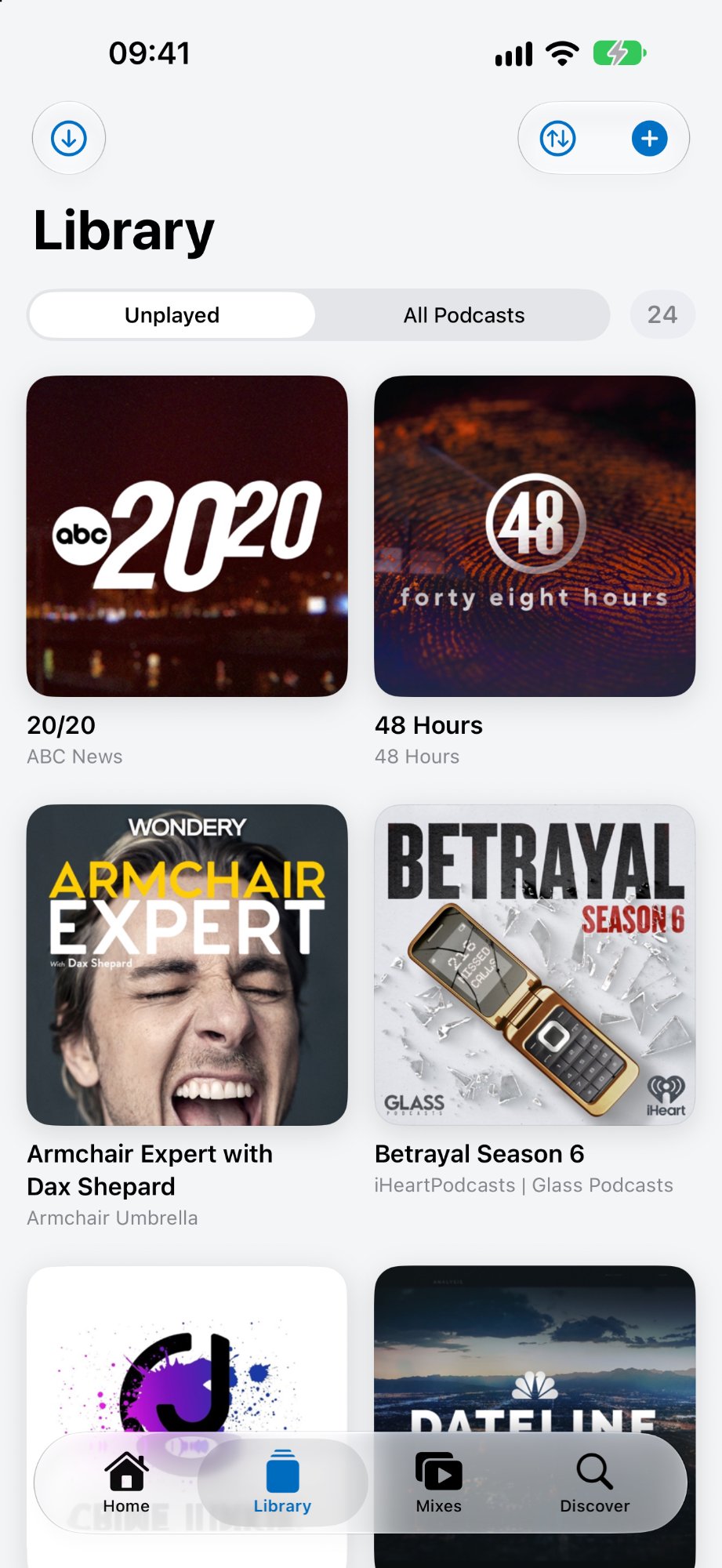
PodcastRack Library grid with Unplayed filter
Your Library

Fast whether you follow 5 shows or 1,000+.

Heavy podcast listeners shouldn’t get punished with laggy lists. PodcastRack keeps your shows in a clean visual rack with instant filtering, an Unplayed toggle, and background episode downloads that respect your storage with auto-delete rules.

Switching from Overcast, Castro, Pocket Casts, or Apple Podcasts? Export an OPML file and bring your entire library over in thirty seconds.

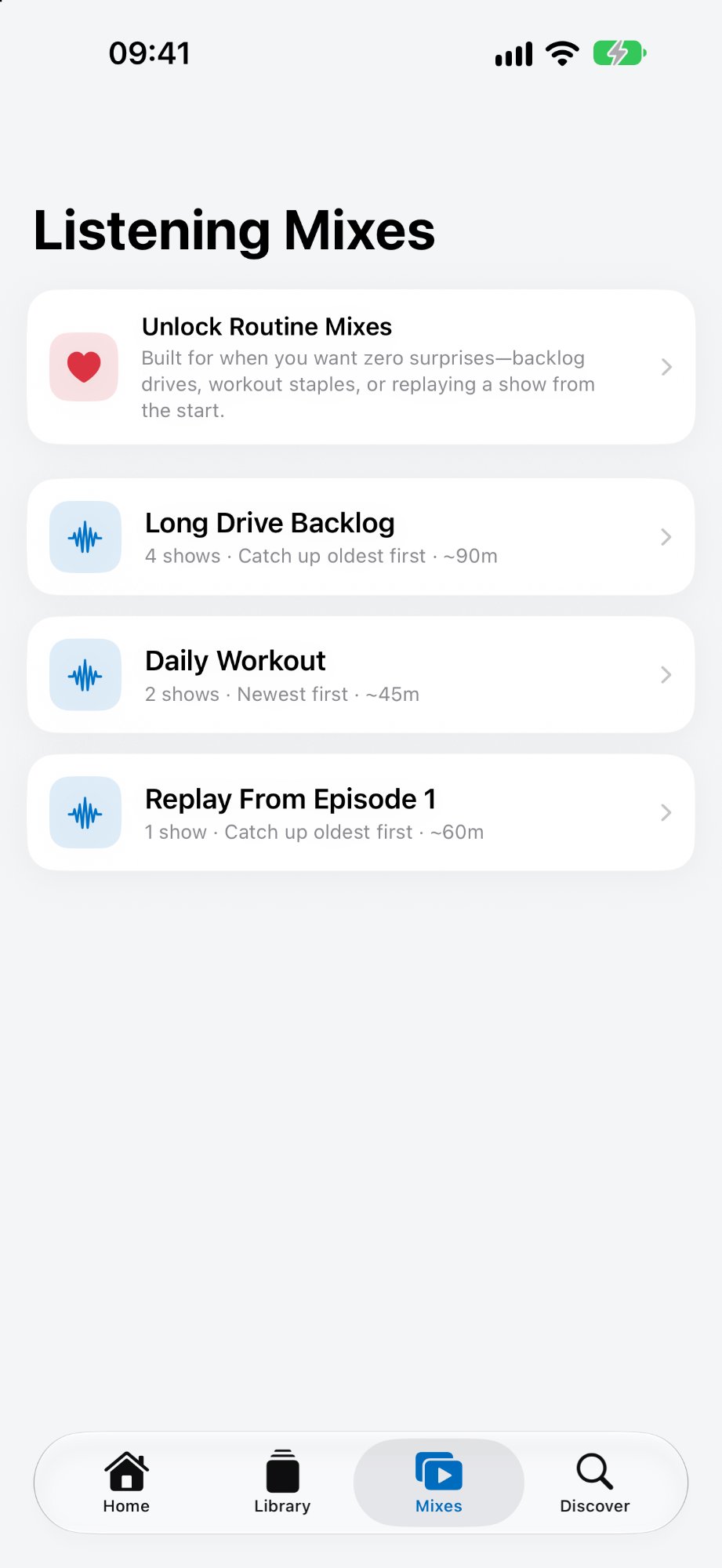
Listening Mixes screen showing Long Drive Backlog, Daily Workout, and Replay From Episode 1
Routine Mixes · Pro

Zero surprises for drives, workouts, and backlogs.

Sometimes you don’t want an algorithm at all—you want a predictable queue built for a specific moment. Routine Mixes let you pick the shows, set the order (newest first, oldest first, or balanced), cap the total time, and pre-download the whole session before you lose signal.

  • Long Drive Backlog — 4 shows, oldest first, timed to ~90 minutes
  • Daily Workout — your 2 high-energy staples, newest first
  • Replay From Episode 1 — binge a favorite series in order
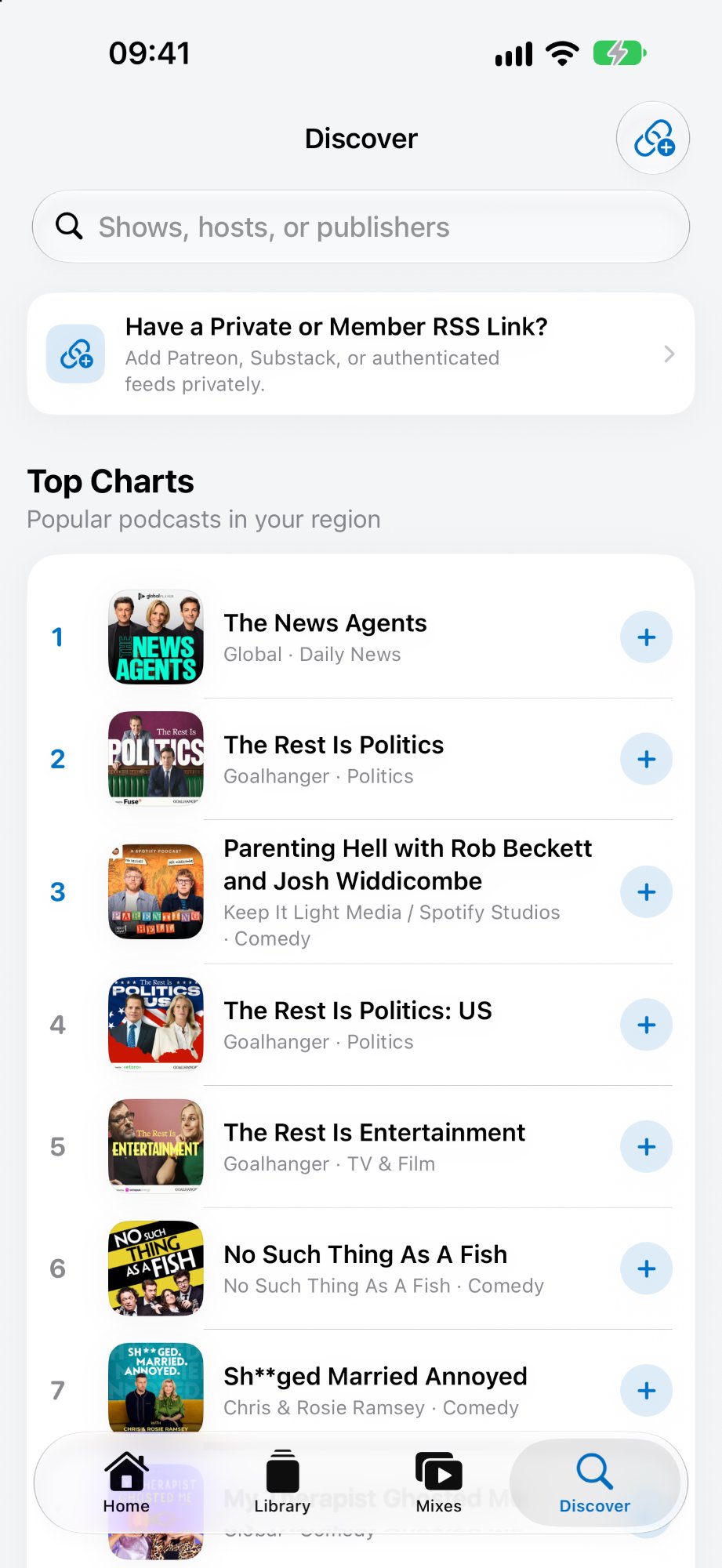
Discover screen with Private or Member RSS Link and Top Charts
Private & Member Feeds

Patreon, Substack, and private RSS—locked in Keychain.

Paid and member-only feeds belong in your player, not a separate browser tab. Paste any private or HTTP Basic-authenticated RSS link and PodcastRack stores your credentials in Apple Keychain. Manual feeds are never submitted to external directories.

Crafted for Listening

The details you notice ten minutes into a drive.

Enhance Voice

Real-time speech clarity and loudness levelling (-17 dBFS target with peak limiting) so quiet hosts and loud ad reads stay balanced—automatically adapting to your phone speaker, headphones, home audio, or car.

Native CarPlay

Browse followed shows and recent episodes right from your dashboard with crisp artwork, serial continuation, and reliable lock-screen/steering-wheel controls.

Per-Show Speed & Chapters

Remember a different playback speed for every show, set a sleep timer, and jump through Podlove and Podcasting 2.0 chapters without losing your place.

Free Core. Optional Pro.

Following shows, Smart Up Next, Enhance Voice, private feeds, OPML, downloads, and CarPlay are free. PodcastRack Pro (monthly or annual with a 7-day free trial) supports independent development and unlocks Routine Mixes, 3-episode Smart Up Next look-ahead, and 365-day listening insights.

Support

Common questions & troubleshooting.

Most questions about Smart Up Next, Routine Mixes, private feeds, downloads, and Enhance Voice are answered right here.

Why did Smart Up Next pick this episode—and how do I change it?

Tap Why? on the Up Next card to see the exact local scoring reasons (listening habit timing, unfinished progress, freshness, download status, or serial episode order). Tap Another Choice to switch to the next best pick, or play any episode directly from your Library.

My Routine Mix ended early or skipped an episode.

Routine Mixes are finite sessions (up to 50 episodes) and stop cleanly after the final episode. Episodes without a published duration are skipped in timed mixes, and serial shows won’t jump ahead past an unplayed or unavailable earlier episode. Starting another show or tapping Play Next manually ends the active mix.

A Patreon, Substack, or private RSS feed won’t load.

In Discover, tap Have a Private or Member RSS Link? and paste the full feed URL. If the feed requires a username and password (HTTP Basic auth), enter them there—credentials are saved in Apple Keychain on your device and are never sent to external directories.

Downloads are using too much space or didn’t start automatically.

Check Settings for your auto-delete preference (immediately after listening, after 24 hours, or never). Automatic downloads run when iOS schedules background refresh; you can also pull down to refresh a show or tap Download Mix manually on Wi-Fi.

Audio levels sound uneven, or Enhance Voice isn’t active.

Enhance Voice automatically adapts to your active output (Phone Speaker, Headphones, Home Audio, or Car) to balance quiet speech and loud segments. Note that Apple does not allow real-time audio-tap processing on HLS streams; standard MP3/AAC podcast files are processed normally.

How do I import/export OPML or restore PodcastRack Pro?

Import or export your subscriptions via OPML anytime in Settings. If you reinstalled the app or switched devices, open Settings → PodcastRack Pro → Restore Purchases.

Still didn’t find what you need?

If you hit a bug or a broken feed, email support@podcastrack.app with your iOS version and the show name or RSS URL. For audio issues, include the summary from Settings → Diagnostics & Privacy → Share playback diagnostics.

Privacy Policy

No accounts. No ad SDKs. Plain English.

Last updated November 29, 2026 · Applies to PodcastRack: Player & Mixes.

Stored on your device

PodcastRack does not require an account and does not collect your name, email, or location. Followed shows, Routine Mixes, playback progress, listening insights, downloads, and artwork caches stay locally on your device. Private feed credentials are stored in Apple Keychain.

Direct publisher & directory requests

RSS feeds, metadata, artwork, and audio files are fetched directly from each podcast’s publisher, subject to their privacy practices. Directory searches contact Apple Podcasts and Podcast Index via our search proxy (cache keys are hashed; request logging is disabled). Private and manual feeds are never submitted to external directories.

Optional unlinked listening totals

To power public show-connection discovery, PodcastRack can share unlinked daily totals for public directory shows (public podcast ID/URL, UTC day, whole minutes, play/completion counts, and 30-day public show-pair counts) using a one-time random retry ID. It never sends a user, device, or installation ID, episode title, playback position, timestamp, or library list—and private, authenticated, or token-bearing feeds are always excluded. Turn this off anytime in Settings to stop collection and clear pending local totals.

Purchases, crash logs & deletion

Pro subscriptions are handled by Apple via StoreKit; we never see your payment details. Optional iOS crash logs are only shared if you enabled them in iOS Settings. Deleting the app removes your local library, mixes, and cached audio. Questions? Email support@podcastrack.app.

PodcastRack app icon

Ready to just press play?

Download PodcastRack: Player & Mixes on the App Store.

Download on the App Store